Donate in PUBG Mobile - Top up your UC using ID
 Instant delivery
 Official top-up
Drop onto the battlefield and conquer in PUBG Mobile with UC at your disposal — purchase exclusive skins, outfits, the Royale Pass, and other premium content, upgrade your arsenal, and stand out in every battle!
1. Select amount to top up
2. Provide Player ID
3. Select payment method
💰 How to top up PUBG Mobile UC in Russia and CIS
Select the desired UC package from the options available on this page.
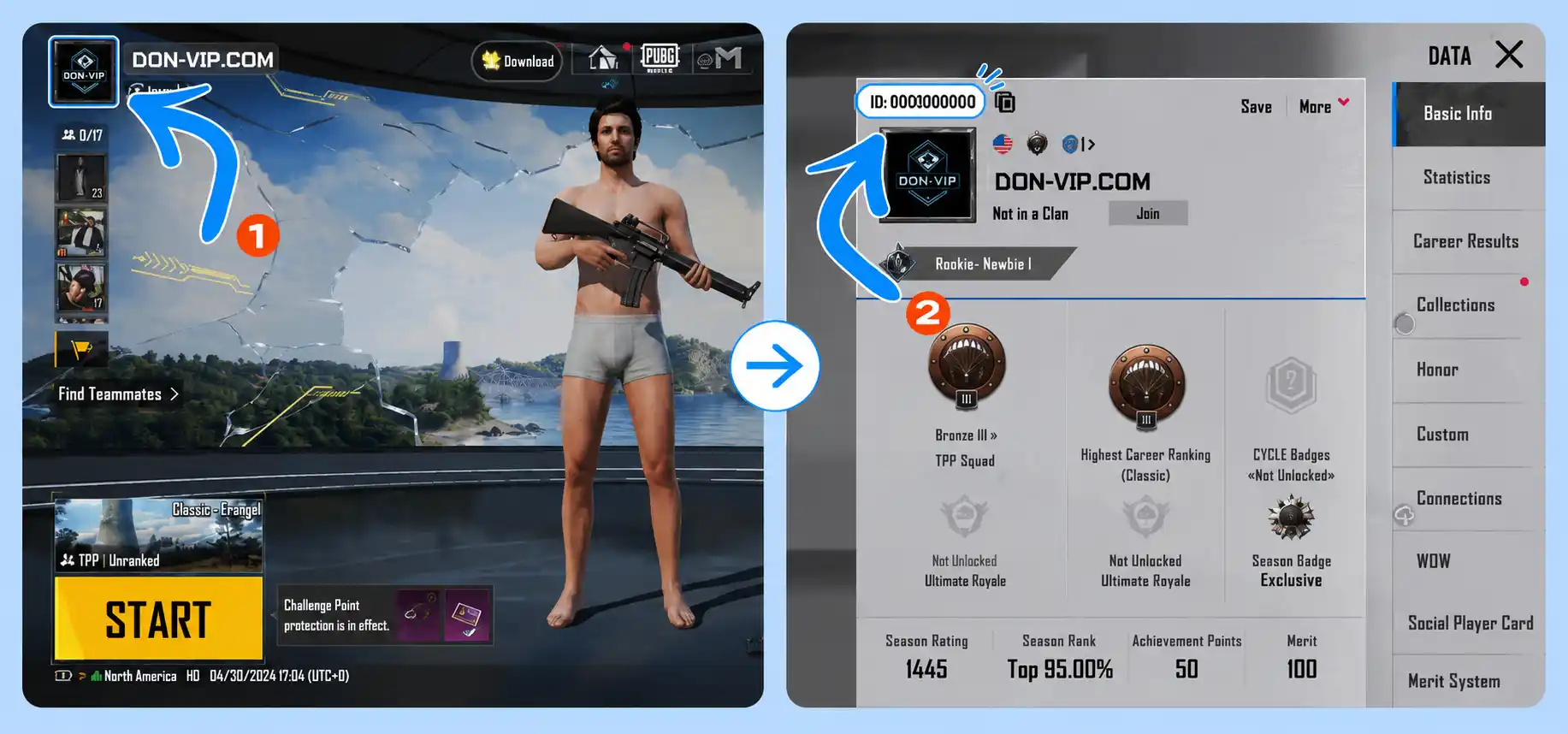
Enter your PUBG Mobile Player ID. You can find it in the "Basic Information" section by opening your profile in the game.
Carefully verify the entered information and choose your preferred payment method.
After payment confirmation, your order will appear in your account dashboard, and the UC will be credited automatically within a few minutes.
Important: Completed orders cannot be canceled or refunded. Please carefully verify your Player ID before making a payment. Bonus UC are not counted toward additional in-game bonus calculations. Certain bundles and passes may be unavailable for accounts linked to MidasBuy.
Your Order
PUBG Mobile
UC
Your payment is secure. We use modern encryption technologies to ensure the security of your data.