How to Find Your Player ID in BIGO LIVE: Step-by-Step Guide
How to Find Your Player ID / UID in BIGO LIVE: Step-by-Step Guide

Author: Anna Voronova, a practicing specialist with 12 years of experience in mobile platforms and streaming. Updated: 2026-07-22.
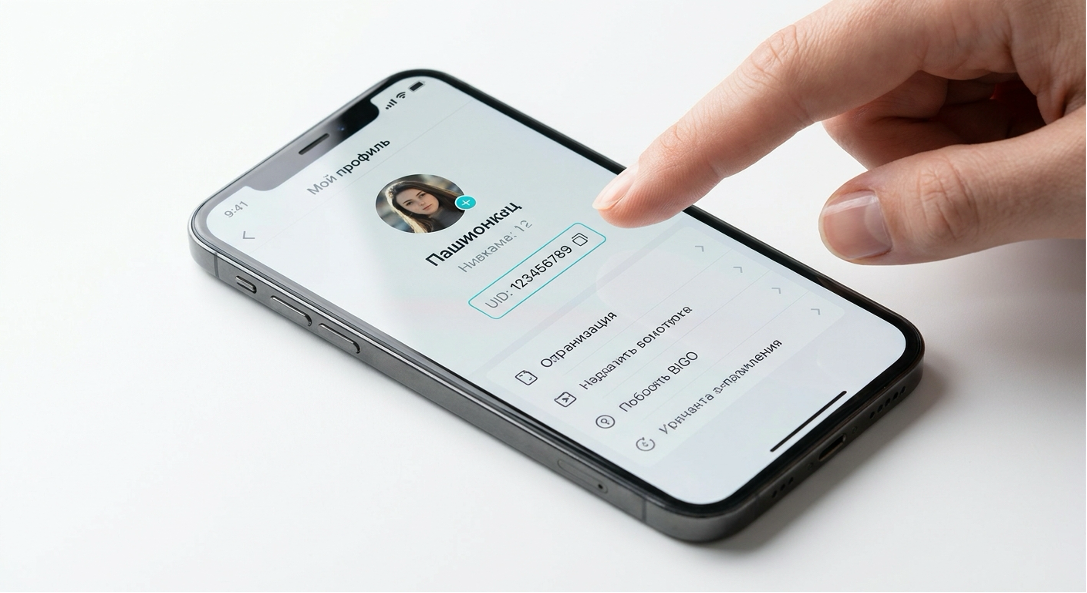
To find your Player ID (UID) in the BIGO LIVE mobile app, open the “Me” tab in the bottom-right corner of the screen, go to the settings menu (gear icon), and copy the numeric code shown in your profile. You will need this unique identifier to safely top up your diamond balance.
If you are planning to purchase BIGO LIVE diamonds to support your favorite streamers, you will definitely need your profile’s unique identifier. In this guide, we will explain in detail how to find and copy your UID.
What Is a Player ID (UID) and Why Is It Needed for Top-Ups?
A Player ID (or UID) is a unique numeric code assigned to every account when it is registered in the system. It is required to accurately identify your profile when virtual currency is credited through third-party services.
When you plan to top up your balance, the system needs to know exactly where to send the funds. This is precisely what your personal identifier is used for.
How Is a Player ID Different from a Nickname and a Streamer ID?
In practice, users often confuse these concepts. A nickname is your public name and can be changed. A streamer ID is another person’s identifier—the ID of the person hosting a live stream. Unlike these, your UID is a permanent system number. If you enter a nickname instead of the numeric code when making a purchase, the transaction will not go through.

How to Find Your Player ID in the BIGO LIVE Mobile App: Step-by-Step Guide
To find your numeric identifier in the mobile app, simply open your user profile through the “Me” tab and access the main settings. The process takes no more than a minute.
In my work with mobile platforms, I regularly check whether interfaces remain up to date. While testing the process in the 2026 version of the app, I confirmed that the basic location of these elements remains consistent. Follow these steps:
- Step 1. Open the BIGO LIVE mobile app on your smartphone and sign in. Tap the “Me” tab in the bottom-right corner of the screen.
- Step 2. Open the settings menu. To do this, tap the gear icon (or the three-dot menu) in the upper corner of the screen.
- Step 3. Find the line containing your UID. In the “Account” section, or directly below your avatar, you will see the numeric code you are looking for.

How to Copy Your UID Without Errors and Save It to the Clipboard
To copy the number without mistakes, use the app’s built-in copy function by tapping the special icon next to your UID. This will save the numeric code directly to your device’s clipboard.
Manually entering long numbers often leads to typos. One-click copying ensures that the data is pasted correctly into the payment form. A practical tip: how can you make sure you copied your own identifier rather than someone else’s? After pasting the number into the field on the website, return to your account profile and visually compare the first and last three digits. This simple check completely eliminates the chance of an error.
Where to Find Your Player ID in the BIGO LIVE Web Version on a Computer
In the BIGO LIVE web version on a PC, your Player ID is located in the profile drop-down menu that opens when you click your avatar in the upper-right corner of the browser. This method is convenient if you make transactions from a computer.
If you prefer to top up BIGO LIVE diamonds through a desktop browser, go to the platform’s official website and sign in to your account. Then simply click your profile picture. In the window that appears, your unique number will be shown next to the settings section.
Is It Safe to Share Your UID? Addressing the Main Concerns
Sharing your UID with a third-party service is completely safe because this number is simply a public address used to credit funds and does not provide access to account management. Without your password, unauthorized persons cannot harm your profile.
Many new users worry that sharing information with third parties could cause them to lose control of their page. However, the system is designed so that top-ups work only in one direction.
Expert opinion. A UID is only an identifier, not an access key. It can be compared to the number of your mailbox: knowing it allows anyone to place a letter or package inside, but nobody can read your private mail without the key—the role played by your password. Therefore, safely sharing your identifier for currency crediting does not carry any risks.
—
mobile application cybersecurity expert
The BIGO LIVE Interface Has Changed: What to Do If the UID Is Not in Its Usual Place
If, after an app update, you no longer see your identifier in its usual location, check the “Account Management” section or tap directly on your avatar. Developers rarely hide this information deep inside the interface.
Interface updates are common in modern mobile services. If the standard UID search does not produce results, I recommend opening the general profile settings. As a rule, basic user information remains accessible within two or three taps from the main screen.
How to Use Your UID to Top Up BIGO LIVE Diamonds via Don-VIP
Once you have obtained your numeric code, you can quickly place an order on the Don-VIP platform: simply choose the desired currency package, paste the copied number into the designated field, and pay for the purchase using a convenient payment method.
The transaction process is intuitive. Go to the page for the relevant game or application, select the amount of virtual currency, and use your clipboard to paste your ID. The system will automatically process the request and credit the funds to your user profile.
Help Information and Support
Before completing a transaction, we recommend reviewing the service’s additional materials. If you have any questions or concerns, you can always visit the FAQ page or contact customer support.
We also remind you that when purchasing BIGO LIVE diamonds on the Don-VIP platform, you receive the assurance of fast delivery using your Player ID. If any technical issues arise, the service specialists will promptly help resolve them.
Frequently Asked Questions
This section contains concise and accurate answers to the most common user questions about finding and using a numeric identifier (FAQ).
What Is a UID and Why Is It Needed for a Top-Up?
A UID (Player ID) is the unique numeric identifier of your BIGO LIVE account. Don-VIP needs it to know exactly which account should receive the diamonds.
Does the Player ID Change Over Time or After Reinstalling the App?
No. Your Player ID remains unchanged permanently, even if you delete and reinstall BIGO LIVE. You can always find it in the same account settings area.
Can I Find the Player ID Without Registering or Signing In?
No. The identifier is linked to your account and is displayed only after you sign in. Without logging in to BIGO LIVE, you will not be able to view your UID.
How Can I Make Sure I Copied My Own UID and Not Someone Else’s?
Your UID is always displayed in your personal BIGO LIVE profile after you sign in. As long as you are viewing your own account, the displayed number is your UID.
What Should I Do If I Cannot See the Numeric Identifier in My Profile Settings?
Check whether BIGO LIVE has been updated to the latest version. If the interface has changed, try finding the ID through the “Account” section or contact the Don-VIP help center.
Summary
● Player ID (UID) is a unique numeric code required to credit diamonds to your account.
● In the mobile app, the number is located in your account profile (the “Me” tab).
● In the web version on a computer, the identifier is available in the drop-down menu that opens when you click your avatar.
● Copying the ID using the dedicated button eliminates the risk of typing errors.
● Sharing a UID with third-party services such as Don-VIP is completely safe for your account.
You now have all the information you need to easily find your BIGO LIVE identifier on any device. Copy your UID, go to the Don-VIP platform, and top up your balance with confidence—it is fast, secure, and as simple as possible.
You may be interested

Recommended products


BIGO LIVE
-20%
See more ›
 Soon
SoonBleach: Soul Resonance


Yalla Ludo
See more ›
 Soon
SoonHonkai: Star Rail


Farlight 84

See more ›

Watcher of Realms

See more ›
 Soon
SoonSugo(Non TW)


Chamet

See more ›
 Soon
SoonXena Live

 Soon
SoonJaco

Reviews
No reviews yet. Be the first!