PUBG Mobile Sensitivity Settings: Comfort and Precision Without Compromise
PUBG Mobile Sensitivity Settings: Comfort and Precision Without Compromise

Author: Anna Voronova, practicing specialist with 12 years of experience. Updated: 2026-07-24.
The ideal sensitivity settings in PUBG Mobile are based on balancing three parameters: camera (for comfortable viewing without dizziness), ADS (for precise recoil control while firing), and gyroscope (for micro-adjustments to your aim). To find the sensitivity that works for you, start with baseline values, test them in the Training Grounds, and gradually calibrate them to your device’s screen size and your playstyle.
Proper sensitivity is not just a set of numbers copied from a popular streamer. It is a fine-tuning tool that directly affects your confidence in ranked mode. Below, we will go step by step through how to configure your controls so your hands do not get tired and your shots land accurately.
Basic Camera and Free Look Settings: A Comfortable Starting Point
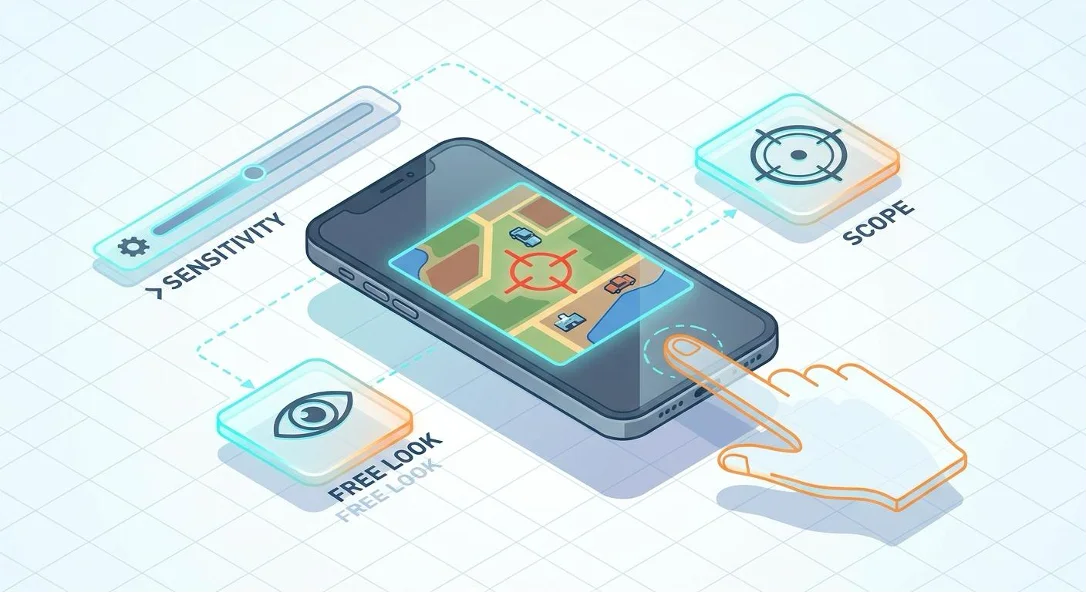
Camera sensitivity controls how quickly the screen turns when you are not firing, while Free Look lets you look around without changing your movement direction. Optimal values for these settings are around 100–120%, helping prevent sudden jerks and reducing strain on your fingers.
Many beginners confuse these settings. Camera sensitivity is active when you are simply running across Erangel and swiping the screen. If the sensitivity is set excessively high, even the slightest movement can cause dizziness and quickly tire your thumb. Free Look mode (the eye icon) has its own slider. It is used to safely check your flanks while sprinting. Set the baseline value to around 110%—this provides a comfortable field of view and helps you spot enemies in time without discomfort.

ADS Sensitivity for Each Scope: From Red Dot to 6x
ADS sensitivity is active while firing and directly determines your ability to control spray. For a Red Dot sight, values of 50–60% are ideal, while high-magnification optics (4x and 6x) should be reduced to 15–25% to prevent the crosshair from overshooting.
Why 50–60% specifically for Red Dot and Holographic sights? Reaction speed is critical in close combat. If the value is lower, you may not be able to move your aim onto a moving enemy quickly enough. For 2x and 3x scopes, smoother movement is needed, so the optimal range is 30–40%. High-magnification optics (4x and 6x), on the other hand, are used for precise shooting at medium and long distances. Here, even a tiny finger movement can shift the barrel several meters off target, so lower sensitivity (15–25%) provides stable accuracy and tighter shot grouping.

Gyroscope in PUBG Mobile: Enabling, Calibration, and Advanced Techniques
The gyroscope uses the smartphone’s built-in motion sensors, allowing you to control your aim by physically tilting the device. It is one of the best tools for smooth tracking and recoil compensation, but it requires gradual adaptation, starting with lower values.
For your first setup, we recommend enabling the gyroscope in 'Scope On' mode so you do not disrupt your usual muscle memory while running normally. Calibration should be gradual: start with 100% for Red Dot and 40% for 4x. However, the gyroscope is not suitable for everyone. If you play on a heavy tablet, excessive sensitivity can cause screen shake from natural hand tremor. In such cases, as well as when playing in a moving vehicle, it is better to disable the gyroscope or reduce its sensitivity to a minimum and rely on traditional swiping.
Adapting to Your Device and Playstyle: iPhone, iPad, and Aggressive Play
Screen size physically limits the range of a swipe, so settings for a compact iPhone will generally be higher than those for a larger iPad. When copying someone else’s pro configuration, always take your own playstyle and device dimensions into account.
An aggressive playstyle with shotguns and submachine guns (SMGs) requires instant 180-degree turns. In this case, you can increase the base camera sensitivity by 10–15%. But remember: a settings preset from your favorite esports player is not a magic solution. What works perfectly on a streamer’s smartphone may be unplayable on your device because of differences in screen size and grip.
Expert opinion. On tablets, excessively high gyroscope sensitivity causes small aim tremors rather than improving accuracy. It is more effective to increase the physical range of your hand movement than to push the sensitivity slider to its maximum.
—
practicing PUBG Mobile esports coach
Recoil Control Through ADS Sensitivity: Drills and Calibration
Weapon recoil is compensated by moving your finger downward, and ADS sensitivity determines how strong that movement needs to be. Regular drills in the Training Grounds with popular assault rifles will help build muscle memory.
To spend less time adjusting settings during real matches, use calibration drills. Reliable spray control can only be developed through practice.
● Use an M416 without recoil-compensating attachments (extended magazine only).
● Stand 50 meters away from a stationary target.
● Fire the entire magazine while trying to keep the crosshair on one point, moving your finger downward evenly.
● If the crosshair moves upward, increase ADS sensitivity by 2–3%. If it pulls downward, reduce it.
Safe Experimentation: How to Test Sensitivity Without Ruining Your Setup
Any changes to your settings should be made gradually, after saving your current parameters to the cloud. If the controls become uncomfortable, you can quickly roll back to values you already know work well.
Many players are afraid to touch the sliders because they worry about ruining their familiar shooting feel. To avoid this, create a backup of your control layout before making any changes. Test new settings only in the Training Grounds, not in a ranked match. If you lose track of the numbers, the game always provides a reset option: simply tap 'Default' to restore the factory settings and start calibration again.
Frequently Asked Questions
Should You Enable the Gyroscope on a Large Tablet?
Yes. The gyroscope provides smoother camera movement and tracking. However, it takes practice and usually requires significantly lower sensitivity to prevent screen shake while holding a heavy device.
Does Free Look Sensitivity Affect Recoil Control?
No. Free Look controls only camera rotation without aiming (the eye icon). Recoil and bullet spray are controlled by ADS sensitivity.
Can You Adjust Sensitivity So You Need Less Spray-Control Practice?
Proper ADS sensitivity makes recoil easier to learn and more predictable, but it cannot fully replace regular practice and developed muscle memory.
What Is Pixel Sensitivity and Is It Worth Using?
It maps finger movement to the physical pixels of the screen instead of abstract in-game units. For most casual players, the standard mode is more convenient and predictable.
Where Can You Find Up-to-Date Pro Configurations for the Current Season?
Reliable presets are published by official esports team communities, match-analysis channels, and trusted YouTube guides from professional players.
Summary
● Keep camera settings (viewing) and ADS settings (shooting) separate to avoid accidental aim disruption.
● Calibrate the gyroscope gradually, starting with small tilt angles so you can get used to the motion controls.
● Adapt any pro configuration to your device’s screen size (iPhone or iPad) and your individual grip.
● Always back up your control layout before testing new values in the Training Grounds.
Conclusion
Sensitivity is not magic—it is a tool you customize for yourself. Start with a safe baseline, then gradually fine-tune the values for each scope and device. Do not be afraid to test the gyroscope and adapt other players’ presets; that is how you will find controls that make every firefight feel intuitive and comfortable, while making ranked mode more enjoyable and successful.


You may be interested


Recommended products

PUBG Mobile
See more ›
 Soon
SoonTarbi3ah-baloot


Jawaker

See more ›

Yalla Ludo
See more ›
 Soon
SoonZaffa Live(MENA)


WeSing

See more ›
 Soon
SoonPUBG New State Mobile

Watcher of Realms
See more ›
 Soon
SoonDiDO

 Soon
SoonWeTV

Reviews
No reviews yet. Be the first!